Home / Case studies / Wallco
WordPress and WooCommerce case study

Wallco Website: A Booking-First WordPress and WooCommerce Build for Wall Makeovers

How Conceptial Media built wallcompany.in, so homeowners can understand wall makeovers, book a consultation in four easy steps and pay online, while search engines and AI answer engines can read every step.
WordPressWooCommerceConsultation bookingSEO and AEO ready
wallcompany.in
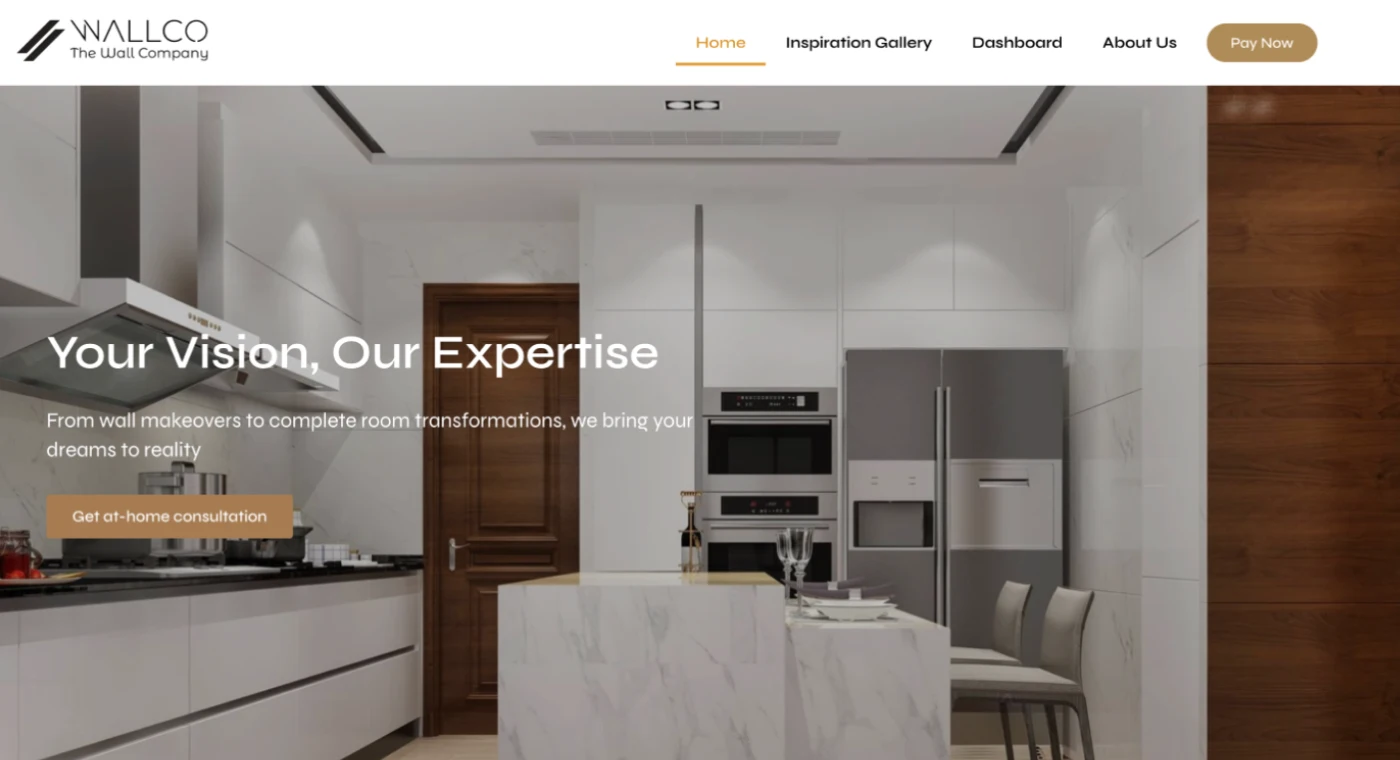
Wallco website homepage with the headline Your Vision, Our Expertise and a Get at-home consultation button over a modern kitchen
ClientWallco, The Wall Company
IndustryHome wall makeovers
PlatformWordPress and WooCommerce
Our scopeDesign, build and SEO structure
AudienceHomeowners booking makeovers
Overview

The Wallco project at a glance

Conceptial Media built wallcompany.in, a WordPress and WooCommerce website for Wallco, The Wall Company. Homeowners see what a wall makeover includes, book a consultation in four easy steps, pay online and manage their account, all in one clear flow that search engines and AI answer engines can read.
4easy steps from booking to installation
₹49consultation booking shown on the site
10 to 6booking time slots, 10:00 am to 6:00 pm
1 dayfor panel installation, as Wallco states
Figures are Wallco's own, as shown on wallcompany.in.
The brief

Six buyer questions, six website answers

Every part of the Wallco website answers a real question a homeowner asks before booking a wall makeover.
Challenge 01

Visitors need to know what happens next

A wall makeover is a big decision inside a home. Before booking, people want to see how the process runs, what it costs to start and who turns up.
Our answerA four-step journey, shown on the home page and repeated through the booking flow.
Challenge 02

Booking had to take minutes

Choosing a service, a day and a time should not need a phone call.
Our answerA WooCommerce booking flow: pick the service, a date and a time slot, then check out.
Challenge 03

People compare prices early

Homeowners look for a starting price and a low first cost before they commit.
Our answerA visible starting price and a low-cost consultation booking, shown up front.
Challenge 04

Payments had to feel safe

Customers need an easy, trusted way to pay.
Our answerA Pay Now button in the menu opens a Razorpay payment link.
Challenge 05

Customers come back

People check their bookings and details after they book.
Our answerA Dashboard area where customers manage their account.
Challenge 06

Findable by search and AI

Buyers search by service, and AI tools quote pages that answer clearly.
Our answerClear headings, plain-language steps and question-style FAQs.
How booking works

Book a wall makeover consultation in four easy steps

The same four steps run through Wallco's service and through the website, so a homeowner always knows what comes next.

Book

Choose a service, then a date and a time between 10:00 am and 6:00 pm, then check out.
On the site: WooCommerce booking and checkout

Expert consultation

The team helps you choose a look, you pick from the panels and you get an instant price quote.
On the site: Wood Series and Marble Series themes

Panel delivery

All panels are delivered, and the accessories arrive two days before installation.
On the site: Clear delivery step before the work starts

Panel installation

The wall is transformed in a single day, and the team brings all the tools and materials.
On the site: One-day installation, as Wallco states
The website repeats these four steps on the home page and in the booking flow, so visitors always see the next step.
The booking concept

Book a consultation as easily as ordering a home service

Many people already know how to book a home service on an app like Urban Company: choose the service, choose a slot, pay, and a professional turns up. Wallco's website follows that same familiar concept for wall makeovers, so booking feels simple from the first click.
01

Pick the service first

Visitors start with what they need, an interior or exterior wall makeover, not with a long form.
02

Choose a slot yourself

A date and a time between 10:00 am and 6:00 pm are chosen on screen, with no back-and-forth calls.
03

See the price before you pay

The consultation booking amount and the starting price are visible up front.
04

Pay online, then track it

Checkout and a Razorpay link handle payment, and the dashboard keeps the customer in the loop.
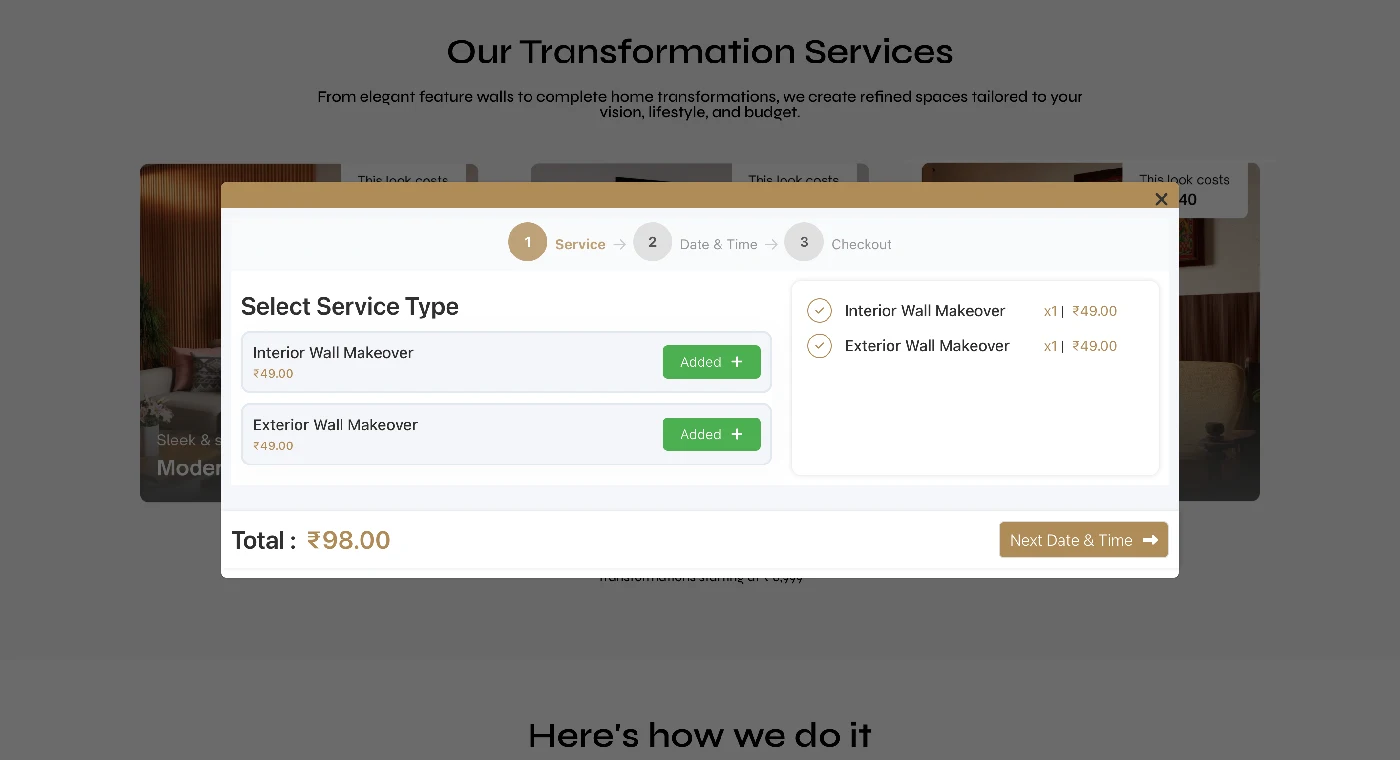
Wallco booking pop-up with three steps: Service, Date and Time, and Checkout, showing Interior and Exterior Wall Makeover at ₹49 each
The real booking pop-up on wallcompany.in: step 1 Service, step 2 Date and Time, step 3 Checkout, with each wall makeover consultation at ₹49. Wallco is not affiliated with Urban Company.
What we built

A booking website, not just a brochure

Six working parts turn a visit into a booked consultation.
01

A WordPress foundation

A clean, editable WordPress build, so the Wallco team can update pages, images and offers without a developer.
02

WooCommerce consultation booking

Visitors choose an interior or exterior wall makeover, then a date and time, see a cart-style summary with a running total and move to checkout.
03

Time-slot selection

Booking slots run from 10:00 am to 6:00 pm, so customers pick a time that suits them.
04

Razorpay Pay Now link

A Pay Now button in the main menu opens a Razorpay payment link for online payments.
05

Customer dashboard

A Dashboard link takes customers to their account area, so they can come back to their details.
06

Inspiration Gallery and panel series

A gallery and the Wood and Marble panel series let visitors see finished looks before they book.
Site structure

A site map that follows the buyer's journey

Pages are grouped by what the visitor wants to do next: discover, decide, book, pay and manage.
Discover
  • Home
  • Inspiration Gallery
Decide
  • About Us
  • Wood Series
  • Marble Series
Book
  • Consultation booking
  • Service, date and time
Pay
  • Checkout
  • Pay Now (Razorpay)
Manage
  • Dashboard (My Account)
Each stage has one job and one clear next link. Search engines see a tidy topic structure, and visitors never wonder where to click.
SEO and AEO

Built to be found and quoted

SEO helps Google rank the pages. AEO helps AI assistants and answer boxes quote them. The Wallco site is shaped for both.
SEO and AEO practices behind the build
  • One H1 per pageHeadings follow the questions homeowners ask, from H1 to H3.
  • Plain-language stepsProcess and service copy is written as short sentences that search and AI tools can quote.
  • Descriptive imagesImage names and alt text say what the wall, panel or room shows.
  • Internal linksThe gallery, About Us and booking pages link to each other with clear anchor text.
  • Lightweight pagesA clean WordPress build with compressed images keeps pages quick on phones.
  • Structured dataFAQPage and HowTo schema on this case study, and Service and LocalBusiness schema recommended for the live site.
Answers written to be quoted
Question
How do I book a wall makeover consultation?
Answer
Choose an interior or exterior wall makeover, pick a date and a time between 10:00 am and 6:00 pm, then check out. An expert then helps you choose a look and gives you an instant price quote.
Question
How much does a Wallco consultation cost?
Answer
Wallco shows a consultation booking price of ₹49, and wall transformations starting at ₹6,999.
Question
How long does wall panel installation take?
Answer
Wallco states that panel installation transforms the wall in a single day, with accessories delivered two days before.
Results

What the website gives Wallco

A site that explains the service, takes bookings and payments, and is structured for search.

What the website delivers

  • One clear path from first visit to a booked consultation.
  • Online booking and payment, without a phone call.
  • A page structure ready for SEO and AEO.
  • Pages the Wallco team can edit and grow.

What we recommend next

  • Add Service and LocalBusiness schema, with the cities Wallco serves.
  • Publish a page for each wall panel series and service area.
  • Add customer reviews and finished-project case studies.
  • Track queries and bookings in Google Search Console and GA4.
We do not publish ranking or booking figures here yet, because we only report numbers we can verify.
FAQ

Wallco website: common questions

What did Conceptial Media build for Wallco?
Conceptial Media built wallcompany.in, the WordPress and WooCommerce website of Wallco, The Wall Company. It explains wall makeovers, shows an Inspiration Gallery, takes consultation bookings with a date and time, links to a Razorpay payment page and gives customers a dashboard.
Is Wallco's booking like Urban Company?
Wallco's website follows the same familiar concept that people know from home-service apps: choose the service, pick a date and time slot, see the price, pay online and get a professional at your door. Wallco is an independent business and is not affiliated with Urban Company.
How do customers book a consultation on the Wallco website?
They choose an interior or exterior wall makeover, pick a date and a time between 10:00 am and 6:00 pm, review a running total and check out. Wallco shows a consultation booking price of ₹49.
What are the easy steps in the Wallco process?
There are four steps. Book a consultation, get expert advice and an instant price quote, receive the panels and accessories, then have the panels installed. Wallco states that installation transforms the wall in a single day.
Why use WordPress and WooCommerce for a wall makeover business?
WordPress makes pages easy to edit, and WooCommerce adds bookings, a cart-style summary, checkout and customer accounts. Together they let a service business take bookings and payments online without a custom-coded system.
How does the website help with SEO?
The site uses one H1 per page, clear headings that match what homeowners search for, plain-language process copy, descriptive image names, internal links between the gallery, About Us and booking pages, and a lightweight WordPress build.
How does the website help with AEO?
Answers come first and are short. Steps are numbered, questions are used as headings, and an FAQ with schema gives AI assistants and answer boxes clean text to quote about booking, cost and installation time.
Can a home service business take bookings and payments online?
Yes. A WooCommerce booking flow lets customers choose a service and a time slot, and a payment link such as Razorpay lets them pay online. A dashboard lets them return to their account.
How can I get a similar booking website?

Share your goals through our contact page. We review your services and market, then plan a WordPress website with booking, payments and a structure built for SEO and AEO.
Your turn

Ready for a website that books your customers?

Tell us about your services. We will plan a WordPress and WooCommerce website with booking, payments and a structure that search engines and AI tools understand.

Let’S Grow Your Brand Online

Start a conversation with us


    Select Services*